

Health
Contact Information
Hayley Brewer - Health Chair
[email protected] | Contact Form
Health Rep on Duty: (817) 540-0108 (press 1, then 2) | [email protected]
Contact Information
Hayley Brewer - Health Chair
Health Rep on Duty: (817) 540-0108 (press 1, then 2) | [email protected]
Health and IOD Text Support Line
The APFA Health and IOD Text Support Line is dedicated to supporting you whenever you need assistance. Call or text the support lines and use the prompts to get the support you need.
Call: 817-382-1575
Select the corresponding prompt, as seen below, and you will receive a detailed pre-recorded message. You will also receive an automatic text message with essential information related to your inquiry. If you prefer to leave a message, include your name, base, and employee number, and a Health or IOD Representative will contact you.
Text: 817-382-1575
Send a message with your name, base, and employee number, and one of our Health or IOD Representatives will contact you.

Health Hotlines
11.03.25 – 2026 Annual Enrollment | Now Through November 19
2026 Annual Enrollment ends Wednesday, November 19 at 11:59 pm (CT). Vie the 2026 Annual Enrollment Cheat Sheet and the
2026 Annual Enrollment Checklist to Determine Your Needs/Explore
10.27.25 – 2026 Annual Enrollment Begins November 3
2026 Annual Enrollment opens Monday, November 3 and closes Wednesday, November 19 at 11:59 pm (CT). View the 2026 Annual Enrollment Cheat Sheet for Medical Options/Paycheck Contributions/Prescription, Dental and Vision Coverage, and the 2026 Annual Enrollment Checklist
10.20.25 – 2026 Annual Enrollment Begins November 3rd
2026 Annual Enrollment opens Monday, November 3 and closes Wednesday, November 19 at 11:59 pm (CT). If you do not participate in annual enrollment, most of your coverage from 2025 will carry over to 2026 with exceptions
10.17.25 – 2026 Benefits: GLP-1 Medication Changes
American Airlines has made a material change to our 2026 healthcare coverage for all American Airlines employees that will significantly impact members who rely on GLP-1 medications for their health and well-being.
10.02.25 – Breast Cancer Awareness Month/Be Pink Merchandise
Breast Cancer Awareness Month takes place every October and focuses on promoting screening and prevention of the disease. The American Cancer Society’s estimates about 316,950 new cases of invasive breast cancer will be diagnosed in women.
9.15.25 – Accolade Services Will Be Discontinued Effective October 1st
Accolade is an independent health benefits navigator that American Airlines has partnered with to help you navigate the healthcare system, make informed health decisions, and understand your health benefits in a personalized way.
9.06.25 – Imputed Income Issues for Domestic Partners’ Dental Plans
American Airlines has notified us of “corrections” to imputed income for Flight Attendants covering domestic partners under the dental plan. While the company admits that an administrative error by Alight caused imputed income not to be recorded in 2024…
8.22.25 – APFA Supplemental Benefits August 2025 Enrollment Period Ends Monday
The August 2025 Supplemental Benefits Enrollment Period, sponsored by APFA, will close on Monday, August 25! This is your opportunity to review and make changes to your APFA-sponsored benefits plan or to enroll for the first time.
2026 Annual Enrollment ends Wednesday, November 19 at 11:59 pm (CT). Vie the 2026 Annual Enrollment Cheat Sheet and the
2026 Annual Enrollment Checklist to Determine Your Needs/Explore
2026 Annual Enrollment opens Monday, November 3 and closes Wednesday, November 19 at 11:59 pm (CT). View the 2026 Annual Enrollment Cheat Sheet for Medical Options/Paycheck Contributions/Prescription, Dental and Vision Coverage, and the 2026 Annual Enrollment Checklist
2026 Annual Enrollment opens Monday, November 3 and closes Wednesday, November 19 at 11:59 pm (CT). If you do not participate in annual enrollment, most of your coverage from 2025 will carry over to 2026 with exceptions
Benefits
APFA Supplemental Benefits
Colonial APFA Supplemental Benefits
If you carry any supplemental benefits sponsored by APFA, we have a website dedicated to answering your questions. Learn more about your policies, file claims, or contact a representative who can assist by clicking the button below to visit apfaservice.com
| Plan | Coverage* |
|---|---|
| Group Accident Insurance | Group Accident Insurance helps pay costs that arise from covered accidents such as fractures, dislocations and lacerations. This plan provides On and Off Job coverage. |
| Group Critical Illness Insurance | Group Critical Illness Insurance helps pay the expected and unexpected expenses that arise from diagnosis of a covered critical illness such as cancer (internal or invasive), heart attack, stroke, end-stage renal failure or a major organ transplant. |
| Group Hospital Indemnity Insurance | Group Hospital Indemnity Insurance helps pay the costs associated with a hospital stay including benefits for hospital confinement, hospital admission, hospital intensive care and intermediate intensive care step- down unit. |
| Group Disability Insurance | Group Disability Insurance helps protect your income in the event that you are unable to work. On and off the job coverage is available. (Maternity Coverage) |
| Group Whole Life Insurance | Group Whole Life Insurance helps provide financial security for your family members. Whole life insurance offers fixed premiums and guaranteed death benefits. The policy builds cash value on a tax-deferred basis. |
| Group Supplemental Dental Insurance | Group Supplemental Dental Insurance provides you with cash benefits for dental care, such as cleanings and preventive care, x-rays and crowns and major services. |
| Group Cancer Insurance | Group Cancer Insurance helps cover medical and non-medical expenses related to the diagnosis, treatment and your recovery. |
* This is a brief product overview only. These plans have limitations and exclusions that may affect benefits payable. Refer to the plans for complete details, limitations, and exclusions.
AA Benefits
American Airlines Benefit Resource
Benefits Service Center
Phone: 888-860-6178
Health & Benefits
If you’re looking for information regarding your medical coverage, dental, vision, prescriptions, or spending accounts visit the Health & Benefits page on JetNet. View AA Health & Benefits Information on Jetnet
StayWell Rx
Eligible Medications and Supplies - View the American Airlines Staywell List
| Medical Coverage Contact Directory | |
|---|---|
| Medical |
Blue Cross Blue Shield: (833) 346-3929 (833-FIND-WAY) Baylor Scott & White Quality Alliance (BSWQA): (800) 784-5473 |
| Dental | MetLife: (866) 838-1072 |
| Vision | EyeMed: (844) 714-5678 |
|
Life Insurance, Accident and Disability Insurance |
New York Life: (800) 238-2125 MetLife: (800) 638-6420 MetLife Disability: (888) 533-6287 Post-Pregnancy Disability Insurance: (888) 533-6287 AA Added Benefits (voluntary Offerings) 855-550-0706 MetLife Legal Plan Liberty Mutual, Farmers GroupSelect and Travelers Home & Auto Lifelock Identity Theft Protection Nationwide Veterinary Pet Insurance (VPI) The Hartford Group Accident Insurance The Hartford Critical Illness Insurance Carrington Discount Dental Plan The Hartford Hospital Indemnity |
| HMO (California) |
Kaiser Foundation Health Plan, California: (800) 464-4000 Triple-S: 800-981-3241 |
| Prescription Drug | CVS Caremark: (844) 758-0767 |
| Health Savings Accounts (HSA), Flexible Spending Accounts (FSA), and Health Reimbursement Arrangements (HRA): | Alight Smart-Choice Accounts: (888) 860-6178 |
| Maternity Post-Pregnancy | Post-Pregnancy Disability Insurance: (888) 533-6287 |
| Employee Assistance Program (EAP) | AETNA: (833) 721-2322 |
| Virtual Doctor Visits | Doctor On Demand: (800) 997-6196 |
| Surgery Support | Surgery Plus: (833) 709-2445 |
|
AA 401(K) Service Center at Fidelity Investments |
401(k) Service Center at Fidelity: 800-354-3412 Fidelity One-on-One Guidance: (800) 603-4015 |
| AA Flight Services Contacts |
FA Service Center: (800) 847-2739 Quick Contact Guide |
| AA Added Benefits (Voluntary Offerings) | (855) 550-0706 |
Disability
AA Disability Information
How to File for Disability
How do I file for short term or long-term disability? Learn how to file for short-term or long-term disability
How to File a Claim
1. Gather your treatment dates, the dates you last worked and were last paid, and your physician’s and supervisor’s contact information.
2. Then call MetLife at (888) 533-6287 and select option 2.
Leaves of Absence
Requesting Leave
Should you need to take a medical leave, FMLA, Leave for a family member, or Maternity leave Absence Tracker is the place to start. This quick guide will walk you through how to create a case and what to expect. Learn About Leaves & Returns
Watch a walkthrough on requesting a leave in Absence Tracker
Unpaid Medical Leave
In the first 12 months of unpaid medical leave, you will pay your current benefit contributions. The company policy is, if you are out longer than 12 months on an unpaid status, you will transition to COBRA. Consolidated Omnibus Budget Reconciliation Act (COBRA) allows you to continue group health benefits. Learn More Here
Personal, Voluntary, Educational, Medical, Family, Military, and Maternity / Paternity / Adoption
For information about contractual leaves of absence, such as Personal Leave, Voluntary Leave, Educational Leave, Medical Leave, Family Leave, Maternity/Paternity/Adoption Leave, and Military Leave view Section 25 of the CBA.
Absence Tracker
You can find the following items in ARC - Jetnet > Team Member Service > Leaves & Returns > Inflight
- Check status of sick leave request
- FMLA Certification Form
- Pandemic Leave- What you need to know
- Pandemic Leave- Applying for Pandemic Leave
- Return to work form
- Summary of Leave Changes
- Check status of FMLA request
In accordance with CBA Section 9.B.2., A Flight Attendant who is unable to report for duty for twenty-one (21) or more consecutive days following the origination of a sick call will be required to notify her/his Crew Manager. The Company may require a Flight Attendant who is unable to report for duty for twenty-one (21) or more consecutive days to present medical documentation.
With the implementation of Absence Tracker, the Company has utilized the ability to auto-designate FMLA while on a medical leave of absence. Your FMLA will run concurrent with any medical leave(s) that are administratively and medically eligible. Therefore, if the absence extends for twenty-one (21) or more consecutive days, you will be required to create a case within Absence Tracker. You will be prompted to complete the Health Care Provider Form (HCP) to substantiate the leave.
If your leave is less than twenty-one (21) days, and you do not wish to utilize FMLA, you are not required to create a case within Absence Tracker. The absence will be subject to the attendance policy without the usage of FMLA. If your leave is medically substantiated/21+ days and you are not eligible for FMLA, the consecutive absence will be non-punitive.
Below you will find the path to Absence Tracker and how to request a new case. Once you create a case, you will be notified if you are administratively eligible for FMLA via email, the US Postal Service and in the view attachments button in absence tracker. The FMLA forms will be provided with each method of communication. If you are not administratively eligible, the information provided on your HCP form will be used to designate a Medical Leave.
Once you create a case within Absence Tracker, it will remain open for fifteen (15) days. Your case does not have to be created on the exact date you are requesting, but it is important to be cognizant of the timeline Absence Tracker provides you to complete your case. The HCP form used to designate FMLA has a timeline as well. You will have fifteen (15) days from the start date being requested on your HCP form to submit your HCP form. There is a unique bar code, shown below, that is for your individual case request. It is important to only use the forms provided. Be sure to follow your case in your case notes in case there is additional documentation or clarification needed. You will have ten (10) days to submit the requested information.
When you create a leave request, all documents needed for your case will be included in the “view” attachments link.
The preferable and easiest method for you to submit your HCP form is by uploading them directly to Absence Tracker. You can scan the forms directly to your computer or even upload a clear photo.
Path to the Absence Tracker is through Jetnet > Team Member Services > Leaves & Returns
FMLA
FMLA (Family Medical Leave Act) allows time off for their own serious health condition, to care for a covered family member with a serious health condition, the birth, placement with the team member for adoption or foster care, and because of a “qualifying exigency” due to a team members covered family member is a military member on active duty or called to covered active-duty status.
If the team member is not eligible for FMLA or has exhausted all their available FMLA hours and needs to take leave for their own serious health condition, their request will be reviewed under Medical Leave of Absence (MLOA). Go to “My View” in Inflight to check your eligibility.
View the Special Rules for Airline Flight Crew Employees Under FMLA
How to File a Wage and Hour Division Complaint with the DOL
Calling Out Sick for an FMLA Covered Illness
Recoding
How to Recode a Sick Absence
If you call out sick for a sequence, standby or reserve day, you must now submit the Intermittent FMLA Recode Request Form on Comply365. You may use the Comply365 on your iPhone EFB or on your personal device by going to aa.comply365.net
Go to Comply365 > Forms > AAFA > FA Admin Requests > Intermittent FMLA Recode Request
Complete the form within 2 days of returning to work from that absence. Consider completing the form immediately after you call scheduling.
ODANs, All-Nighter Turns, Double-Ups & Multiple Duty
If you are scheduled to fly multiple sequences in one day, you call out sick for one of the sequences, and you plan to recode the absence with FMLA, the FASC will wait until all legs of your sequences have originated before recoding your absence.
Example
You are scheduled to fly sequence 12345 which reports at 2140 HBT on the 9th of the month and releases at 0500 HBT on the 10th. You are scheduled an ODAN (sequence 54321) reporting at 2300 HBT on the 10th and releases at 0500 HBT on the 11th. You called out sick for sequence 12345 and on the morning of the 10th, requested a recode for that sequence.
The FASC will notate the call and advise you that they will process the recode when all legs of the sequence departing the evening of the 10th are completed to preserve the second sequence.
Calling In Well
With a valid FMLA designation on file and FMLA days available, you may “call-in-well” to fly prior to your anticipated return to work. However, the time you notify the FASC ultimately determines your ability to Call-In-Well (CIW).
You must submit the Comply365 form (Calling in Well: Intermittent FMLA Recode Request) between 0001 to 1430 HBT the day before you intend to be made available. The deadline to request to CIW is 1430 HBT. If eligible, your request will be processed before 1500 HBT. You are unable to call in well and fly the same day.
By submitting this form, you acknowledge the following:
- The first day of each sequence will remain an Intermittent FMLA absence.
- Calling in well is not applicable for 1-day sequences, ODANS or double-ups.
- If you do not work on the day(s) you've been made well, the absence will revert to FMLA.
FMLA and Flight Service Attendance Policy
Attendance points will not be generated for days covered by FMLA. If a banked point was used to mitigate a point generated by a sick absence, the banked point will be restored overnight after the absence is re-coded as FMLA.
Utilization and Eligibility Hours
You may view your current FMLA utilization and eligibility hours by clicking on 'MyView - Attendance/Performance' in the Welcome box of the Flight Service Website.
On Duty Hours are calculated using the following:
- All time from sign-in to debrief for each day of a sequence, including sit time between flights.
- Layover time is not counted.
- Only actual time worked is included - not the greater of schedule or actual.
- 8:00 (eight hours) is credited for each day of training.
- Scheduled time (sign-in to debrief) for each trip removal for AP/UJ (APFA Removals).
- FA on Special Assignment will receive 5 hours.
If you have any questions about anything in MyView, contact the Flight Attendant Service Center.
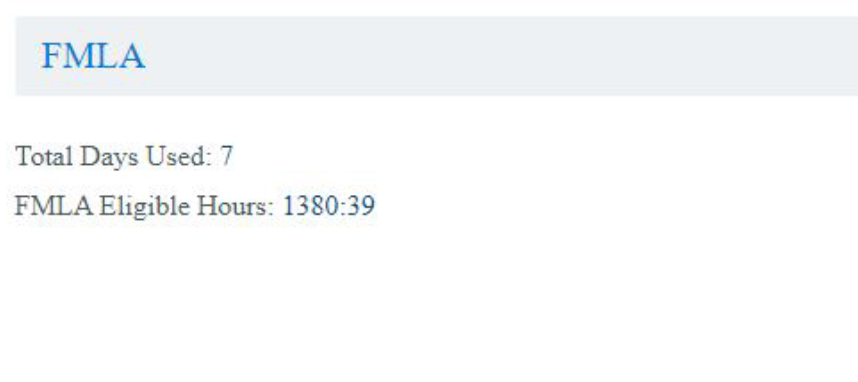
Total Days Used
The number of FMLA days you have used towards the annual allotment of 72 days.
FMLA Eligible Hours
Eligibility hours are calculated in a rolling 12-month period with the current month’s eligibility hours reflecting through the end of the previous month. For example, November 2019 eligibility hours are a sum of November 2018 through the end of contractual October 2019.
Duration & Frequency of FMLA
The duration and frequency of self/caregiver intermittent FMLA leave is only anestimate based on your physician’s recommendation.If the duration of a trip exceeds the duration of your intermittent leave as designated by your physician, your absence can still be recoded as FMLA.
Changes to Your Intermittent FMLA Frequency
If the frequency and/or duration of your episodes significantly change from what was originally designated by your physician, you should visit your physician again to ensure that your FMLA isproperly capturing your need for intermittent FMLA. You must be available 15 days or more in a contractual month to be eligible to accrue Sick and Vacation.
When FMLA is Considered Paid or Unpaid
If your FMLA is for yourself your absence will be re-coded as “IS” in FOS to reflect “Self-Intermittent Paid FMLA” for the portion paid from your sick bank. If you do not have enough sick time available in your sick bank, your sick call will be re-coded as “MF” in FOS to reflect “Self-Intermittent Unpaid FMLA” for the unpaid portion from your sick bank.
How Vacation Days are Used for Intermittent FMLA
FMLA for Yourself
If your FMLA is for yourself and you do not have enough sick time available in your sick bank, at your option, you may use vacation and/or filler days scheduled for later in the year for pay purposes. Your absence will be re-coded as “IV” in FOS to reflect “Self-Intermittent FMLA Vacation” for the unpaid portion from your sick bank. Indicate the vacation block to use. (Ex. back of 09FEB21 block)
Check "UNPAID - No Paid Option / Available / Applied" if this absence was for you and:
— You do not have sick time or
— You do not want to apply vacation hours to this absence
In this case, your absence will be recoded Intermittent FMLA, Unpaid (MF).
"Caregiver" FMLA for a Family Member
If your FMLA is “caregiver” for a family member, your vacation and/or filler days will be used, your absence will be re-coded as “IV” in FOS to reflect “Caregiver-Intermittent FMLA Vacation”. You will need to let the FASC know which vacation and/or filler day(s) you want to use.
If your FMLA is “caregiver” for a family member, and you don’t have enough vacation days, your absence will be re-coded as “MF” in FOS to reflect “Caregiver-Intermittent FMLA Unpaid”.
Vacation days bid in the annual vacation process in blocks of seven (7) or more consecutive days will be paid and credited at four (4) hours per day at your current rate of pay. Vacation days in blocks of less than seven (7) consecutive days will be paid and credited at three and one-half (3.5) hours per day. Vacation days used for FMLA will be paid and credited based on your longevity at the time the vacation days are utilized (Vacation pay for FMLA should be based on original block bid - Presidential Grievance Pending).
| FOS | FMLA Type | Sick Bank Used? | Vacation Used? |
|---|---|---|---|
| IS | Self-Intermittent | Yes | No |
| MF | Self-Intermittent | No Hours Available | No |
| IV | Self-Intermittent | No | Yes |
| IV | Caregiver-Intermittent | No | Yes |
| FM | Caregiver-Intermittent | No | No Days Available |
Maternity
Getting Started: Information to Know
Online Resources
AA's Maternity Leave Information: Flight Service website.
MetLife’s Post-Delivery STD Plan: New Parent Resources
MetLife: Medical Substantiation Form for Post Pregnancy Short Term Disability
Order a maternity uniform (Optional): Visit the Lands' End Website
Maternity Leave Process
Maternity leaves typically consist of three different portions: Maternity Medical, Maternity Disability, and Maternity/Paternity Personal Leave
Returning To Work
Should you go out on a Medical Leave prior to birth and return to work prior to birth, you will need to submit a RTW form via Absence Tracker.
Otherwise, your RTW period will be following Maternity Disability period OR Maternity/Paternity Personal Leave of Absence period if you elect to take the PLOA following disability.
Maternity Intermittent Sick
Pregnancy/Maternity case must be approved prior to submitting recode request. You can view your Maternity Leave status in Absence Tracker. Call out sick with Crew Scheduling for a sequence, standby, or reserve day before submitting the Maternity Intermittent Recode Form
State Specific Entitlement Programs
Return to Work
Returning to Work
If your leave requires a return-to-work form, it can be found in your Absence Tracker case management file under “view attachments” link.
Need Help?
For specific questions related to returning to work from a Leave contact the APFA Scheduling or Contract departments
Contract Department Contact Form
Contract Rep on Duty Contact Form
Scheduling Department Contact Form

APFA Headquarters
1004 West Euless Boulevard
Euless, Texas 76040
M-F: 9:00AM - 5:00PM (CT)
Phone: (817) 540-0108
Contract & Scheduling Desk
M-Th: 9:00AM - 5:00PM (CT)
Phone: (817) 540-0108
Live Chat Messaging
Fridays: 9:00AM - 5:00PM (CT)
Currently, no scheduled events...
Support
Contact APFA
Website Feedback
Privacy Policy
Terms of Service
Jobs